

See how Sage Intacct’s Finance Intelligence Agent helps school finance teams analyze data, find answers, and make informed decisions.
I remember when preparing for a road trip meant stopping at a gas station or bookstore to buy a paper map, unfolding it across the front seat, and tracing the best route by hand. If you missed a turn, getting back on track could take time.
Finding answers in financial data can feel much the same way. The information is there, but locating the right insight often requires navigating through reports, transactions, and spreadsheets. The Finance Intelligence Agent is Sage Intacct's AI-powered assistant that acts like a GPS for your financial data, helping you quickly find answers, uncover insights, and spend less time searching.
School finance teams are under constant pressure to provide timely insights, answer complex questions, and make informed decisions while managing large volumes of financial information. The Finance Intelligence Agent helps schools uncover trends, understand the drivers behind financial results, and quickly access information using natural language prompts.
It can analyze, visualize, and summarize financial data, as well as provide guidance on how to perform tasks within Sage Intacct. Built-in transparency allows users to understand and validate AI-generated responses.
The Finance Intelligence Agent in Sage Intacct currently supports the Accounts Payable, Accounts Receivable, Cash Management, Order Entry, and Purchasing modules. It only returns information users are authorized to access, enforcing existing Sage Intacct user roles and permissions.
Whether you need to review AP bills for a specific project, analyze overdue invoices, forecast cash collections, or identify purchase requisitions without attachments, Finance Intelligence Agent helps school business offices work more efficiently.
To explore the types of questions Finance Intelligence Agent can answer, review the prompt library, which includes a list of common prompts that you can copy and customize to fit your school’s needs.
Accounts Payable example
Let’s say a school administrator wants to know the total amount of Accounts Payable bills entered for a specific project or grant this month. Instead of locating and filtering a report, I can click the Copilot icon from any page in Sage Intacct to open the Copilot panel.
From there, I can select a suggested prompt or enter my own. If I need help, I can access the prompt library directly from the panel.
Copilot panel:
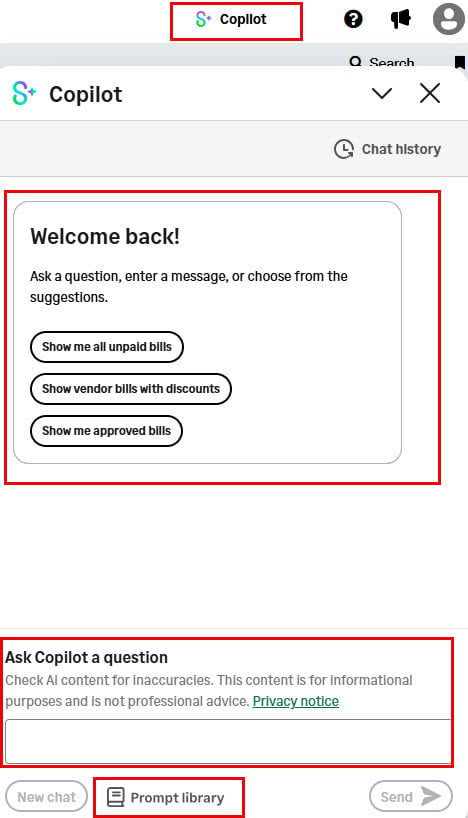
In the “Ask Copilot a question” area, I entered the prompt “Show AP Bills with details in current month for project ID 5380” and instantly received the result below.
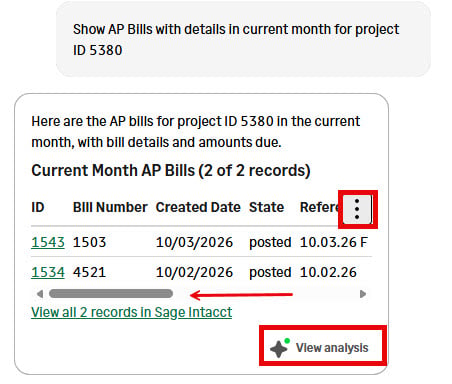
In the Copilot panel, use the scroll bar to view additional accounts payable bill details. Select the vertical ellipsis on the right to copy the table or export it as a csv file to use in Excel.
Selecting “View all 2 records in Sage Intacct” opens the records directly in the accounts payable bill list view in Sage Intacct.
Selecting “View Analysis” in the lower-right corner of the Copilot panel provides additional insights, which can include supporting tables, charts or summaries.
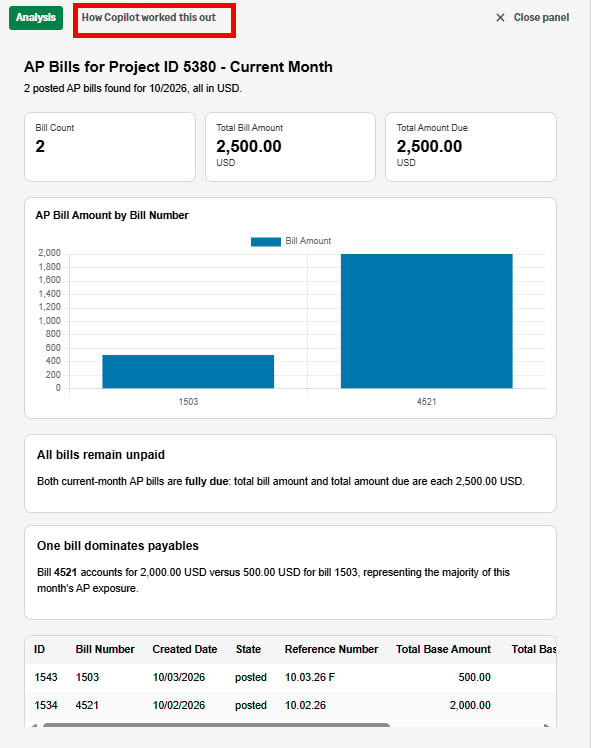
How Copilot worked this out
If you're hesitant to use AI-generated answers when responding to your board or finance committee, you're not alone. Most of us have asked an AI assistant a question, reviewed the response, and wondered whether the answer was completely accurate.
In some cases, a follow-up question may even produce a different result. While AI is a powerful productivity tool, school finance teams need confidence in the information they present. When sharing insights, it's important to understand how that answer was generated to validate the answer before sharing.
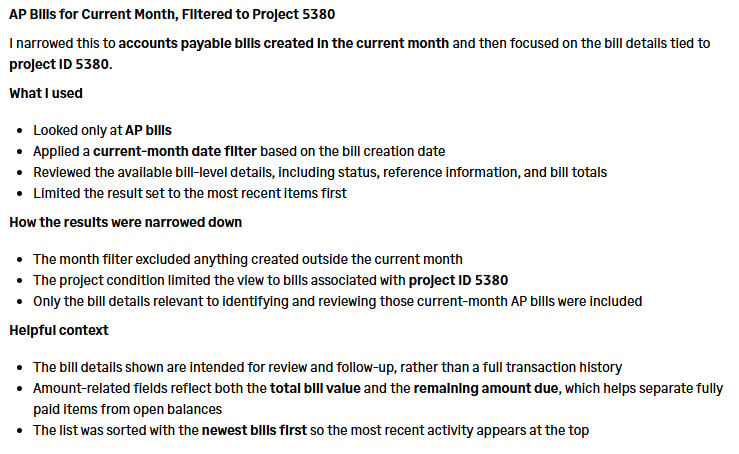
With every response generated by Finance Intelligence Agent, you can select "How Copilot Worked This Out" on the analysis tab to see the data sources, calculations, and methodology behind the result. This level of transparency helps you validate the information and understand the reasoning before using these AI-generated insights in your decision-making.
You can review the detailed steps used to generate the response and independently verify the results. Below is the detailed analysis shown for my simple prompt, “Show AP Bills with details in current month for project ID 5380.”
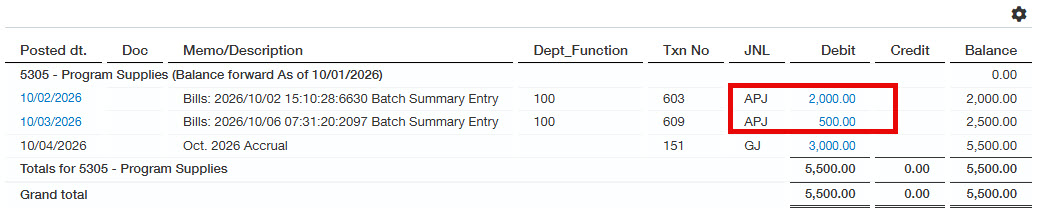
To confirm the prompt returned the intended results, I also ran a General Ledger detail report for Project 5380 for October. The report confirmed Copilot correctly included the two AP invoices and excluded the journal entry accrual as shown below.
Accounts Receivable example
Next, let's explore an Accounts Receivable example. Suppose your school invoiced the state for funding under the customer State Grantor 1. After attending a webinar, you learn the state may prorate funding, meaning schools could receive only 75% of the invoiced amount rather than the full 100%. To understand the potential impact, I prompted, "List invoices for customer State Grantor 1." Finance Intelligence Agent identified three invoices totaling $45,000.
To evaluate the potential impact of the funding reduction, I then prompted, "How much cash can I expect if 75% of these invoices are collected?" Finance Intelligence Agent calculated that, based on total outstanding invoices of $45,000, the school could expect to collect $33,750 at a 75% collection rate. The result was displayed instantly in the Copilot panel, making it easy to assess the potential effect on cash flow.
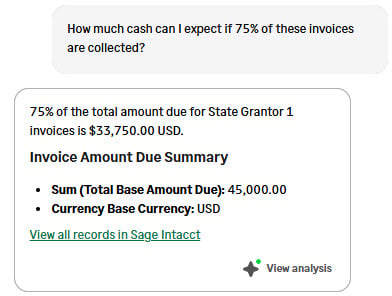
After performing a quick calculation, I confirmed the result was accurate. As with the AP example, Finance Intelligence Agent displays the supporting invoices directly in the Copilot panel and provides options to view the records in Sage Intacct or export the results to a csv file.
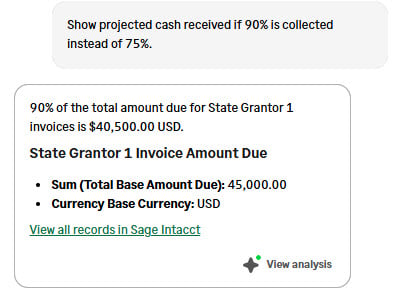
Now, let's say I receive a call from the business manager at a neighboring school who has learned funding may be prorated to 90% instead of 75%. Because I still have the Copilot panel open, I can simply enter a follow-up prompt: "Show projected cash received if 90% is collected instead of 75%." Finance Intelligence Agent immediately recalculates the projection and shows expected collections would increase to $40,500, allowing me to quickly assess the impact of the change without starting the analysis over.
Purchasing example
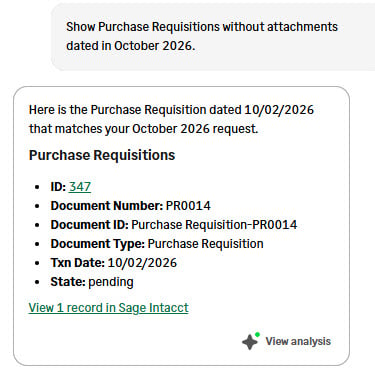
Another practical use case is identifying purchase requisitions without attachments. Rather than opening each requisition individually, I prompted, “Show purchase requisitions without attachments dated in October 2026.” The Finance Intelligence Agent quickly returned one matching record, PR0014, saving time and simplifying the review process.
Recommended practices — writing prompts
These examples illustrate a few practical applications of the Finance Intelligence Agent, but there are many more ways it can help schools analyze data, answer questions, and make informed decisions.
To explore everything Finance Intelligence Agent can do, I recommend reviewing the prompt library and experimenting with different types of questions. Sage Intacct recommends asking clear, specific questions focused on a single topic, then refining your analysis with follow-up prompts. If the results aren’t what you expected, try adjusting the wording of your prompt or providing additional context.
Specificity is key to getting the most accurate and relevant results. Include details such as date ranges, IDs, amounts, or other criteria whenever possible.
A good prompt typically includes three components: an action, a data point, and a scope. Start with an action such as "show" or "list." Next, identify the data you want to analyze, such as "unpaid bills" or "selected AP bills." Finally, define the scope by adding filters such as "for last month" or "over $2,000."
Example prompt: List AP bills over $3,000 for this month.
Pro tips:
- Use the exact spelling, capitalization, and IDs shown in Intacct (for example, E10, not e10)
- To include entity-level data while at the top level, add "include private" to your prompt
- Break complex requests into a series of simple questions and follow-up prompts
How CLA can help schools be more productive using AI
Interested in enabling Finance Intelligence Agent or learning more about Sage Intacct for schools? Reach out to CLA's Sage Intacct team.
Learn how you can connect Sage Intacct and Claude for finance insights, executive-ready narratives, visualizations, trend analysis, and decision-support tools using natural language. Explore other AI-powered productivity in Sage Intacct such as Accounts Payable Automation, General Ledger Outlier detection, and Copilot Variance analysis.
Education finance leaders can also take advantage of AI innovations such as Close Assistant and Close Workspace to streamline the month-end close process.
For additional insights and recommended practices, follow our 2026 Sage Intacct Monthly Webinar Series and Sage Intacct blog.