

Integrating AI into Sage Intacct empowers staff to work more efficiently and focus on strategic priorities, elevating their work impact.
School finance leaders today face mounting pressure: tighter timelines, heightened audit scrutiny, and limited staffing capacity. AI offers a path to modernizing the business office — not through tools alone, but through a deliberate strategy that clarifies where automation creates value, where human judgment must remain central, and how leaders will measure success.
It’s been five years since I worked in a school district managing the financials of the school district. Technology has advanced quite rapidly during that time.
As I look back, I wish I had AI tools available today embedded directly into my accounting software, which is why I get excited about sharing how Sage Intacct’s built-in AI agents automate routine tasks, boost productivity, and streamline business office operations — helping teams save time and focus on higher-value work.
Artificial intelligence defined
AI isn’t just another trendy term, it’s a powerful collection of technologies designed to handle tasks once requiring human intelligence, from spotting patterns to making informed decisions. Within the broader world of AI, machine learning enables computers to learn from data to make predictions or decisions, which improve over time. Generative AI goes a step further, creating brand-new content — whether text, images, or audio — based on prompts or existing examples.
AI strategy for school finance
Developing an effective AI strategy in school finance begins with identifying the outcomes that matter most, such as reducing days to close, improving audit findings, and providing consistent, repeatable processes across the business office. Leaders must also thoughtfully determine where AI creates value and where human experience should remain central, recognizing that automation is best suited for routine, rules‑based tasks rather than nuanced, context‑dependent decisions.
Easing into AI: Practical ways to begin
Before I jump into describing the benefits of leveraging AI within Sage Intacct, I want to take a step back for those of you who feel uncomfortable with the idea of machines handling tasks on your behalf. If AI at work feels intimidating, start small, just like I did.
I got comfortable by using Copilot for everyday tasks in my personal life, like planning a trip. While I used Copilot, you can use whatever AI tool you have access to.
A great way to start using AI is with a tool like Copilot in conjunction with common software you already use like Excel and Word. Copilot, for example, can be used with Excel for formula assistance, cleaning data, data analysis, or summarizing board-ready budget narratives.
You can also use Copilot to compare two files in One Drive and highlight the variances between the files. In conjunction with Word, Copilot can be used to draft content, summarize documents, formatting, editing and proofing. When using Copilot at your school, make sure you are using appropriate security measures to keep data secure. If you are unsure about how to protect your school, CLA can help with AI and cybersecurity.
Benefits of using Sage Intacct with AI
With increased hands-on experience with AI, it will be easier to understand the possibilities around taking your AI use to the next level. While using a tool like Copilot in conjunction with Excel or Word offers many efficiencies, using an accounting system like Sage Intacct with AI embedded in its software is a great way to level up your financial operations, saving your team hours every week.
Using AI already embedded in an accounting system provides a seamless opportunity to leverage AI directly with your financial system where your financial data lives. Using AI in Sage Intacct requires minimal configuration, which saves an enormous amount of time and technical overhead over developing your own AI functionality. With Sage Intacct’s cloud-based functionality and quarterly releases, you can easily leverage new AI functionality as it’s released.
Elevate your team: Harnessing AI for greater impact
AI excels at supporting humans, not replacing them. AI is about creating opportunities for your employees. Let AI handle the mundane tasks and let your employees take on more value-added activities.
This leads to better productivity and happier employees. When you think about AI in terms of providing employees opportunities, instead of replacing employees, the change management portion of implementing AI becomes much easier.
AI’s biggest limitation is that it can’t grasp human context — the dynamics of your community, the politics within your school, or the emotions involved in tough decisions. If you’re considering something sensitive, like closing a school or raising fees for an after school program, AI has no sense of the pushback you may get from families or staff. That’s where human judgment, empathy, and experience remain essential.
Search Help with Copilot
In my blog Sage Intacct for Schools: AI-Powered Productivity, I discussed how Sage Intacct’s AI features help schools work smarter by automating vendor invoice processing, flagging unusual journal entry transactions, and quickly summarizing variances between actual and budget. These tools help cut down on manual tasks, reduce errors, and allow staff to focus on higher-value tasks. Since I published that blog, Sage Intacct has released more AI-Driven tools into Intacct.
While I have always felt the Sage Intacct Help Center is especially strong, they have since leveled up the help offerings by adding Search Help with Copilot, which can interpret natural language questions. This means you can use Search Help to ask a question as if you were talking to a colleague, but you don’t have to wait for her to have time between meetings to help you.
Need to cover for a colleague out on vacation and it has been a while since you entered a bill and cut a check? Simply access Search Help with Copilot and type in “What are the steps for entering a vendor bill and printing a check?” Instantly, you’re presented with a clear, step-by-step guide, and in just a few minutes, able to process that check. This tool is a single, self-service way to find help and answers and quickly delivers relevant and actionable results.
Sage Intacct Close Assistant
The Close Assistant helps you to track and process standard month-end task completion across the Accounts Payable, Accounts Receivable, General Ledger, and Cash Management modules all in one place.
To get started with the Close Assistant, select the Copilot icon, Run Close Assistant, and pick which period you want to close. Then you will be provided with a list of standard month-end close tasks.
If a task is incomplete, an alert icon with an exclamation mark will appear. In the example below, I can see I have unposted Accounts Payable (AP) bills for the current month I need to review.
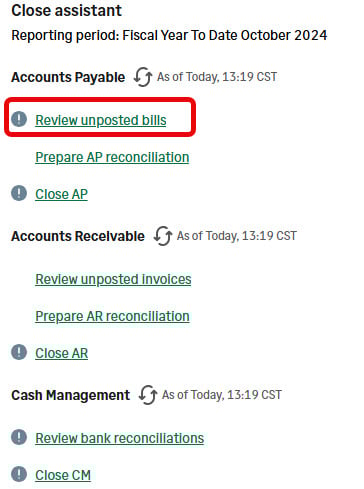
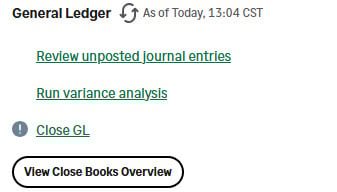
Clicking on “Review unposted bills,” brings me to the Bills List filtered by unposted bills. From there, I can click on the bill to review and post as necessary. Once I post all the drafted bills, I can go back to the Close Assistant task list and click on Regenerate, and I would see the exclamation point alert icon is no longer visible.
Now that my AP bills have all been posted, I am ready to prepare my AP reconciliation. This Subledger Reconciliation Assistant saves time by comparing the Accounts Payable subledger report to the trial balance.
To reduce load time, you can filter by entity or entity group. If there is a variance, the amount will be displayed as well as the most common reasons why you may see a variance to help direct your investigation. Once you have eliminated the variance, you can move on to the next step of closing the AP subledger and work your way through the rest of the Close Assistant task list.
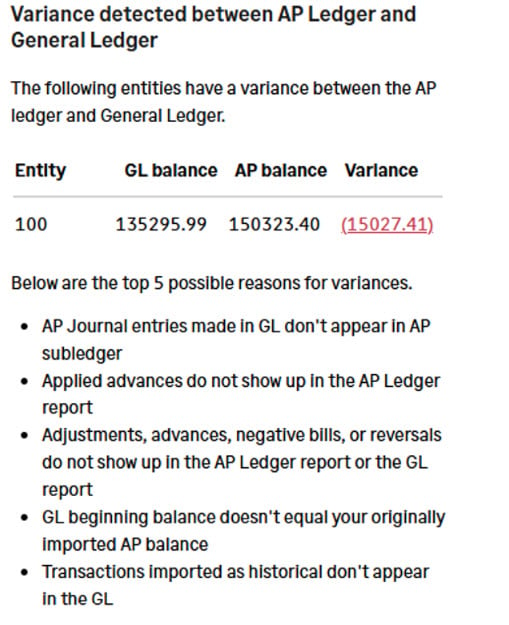
Pro tip: Set your subledger journals such as your Accounts Payable Journal to disallow direct posting to prevent journal entries from posting to these journals.
Sage Intacct Close Workspace
Close Workspace is a central hub to help manage the month-end close process. Throughout my career, the first thing I did in most of my jobs was to set up a monthly close list in Excel.
It always lived on my hard drive, and I would need to share it out with my staff each month via email, making changes month to month. To get status updates, I would have to email or talk to each staff member and go through each of the task items to get an update. It was hard to know where we were in the close process at any given point in time.
Now with Sage Intacct Close Workspace, these monthly close checklists can live and breathe in your accounting system, so you have full transparency for managing the monthly close process.
Sage Intacct comes with several out-of-the-box templates you can start with for creating month-end, quarter-end and year-end close checklists. These templates can be customized for items specific to your school and close process such as accrue legal fees or import payroll journal entry.
The checklist incorporates due dates, dependencies, and a task owner as shown below. Notifications can be configured to alert if a task is approaching a deadline, overdue, or a preceding prerequisite is complete.
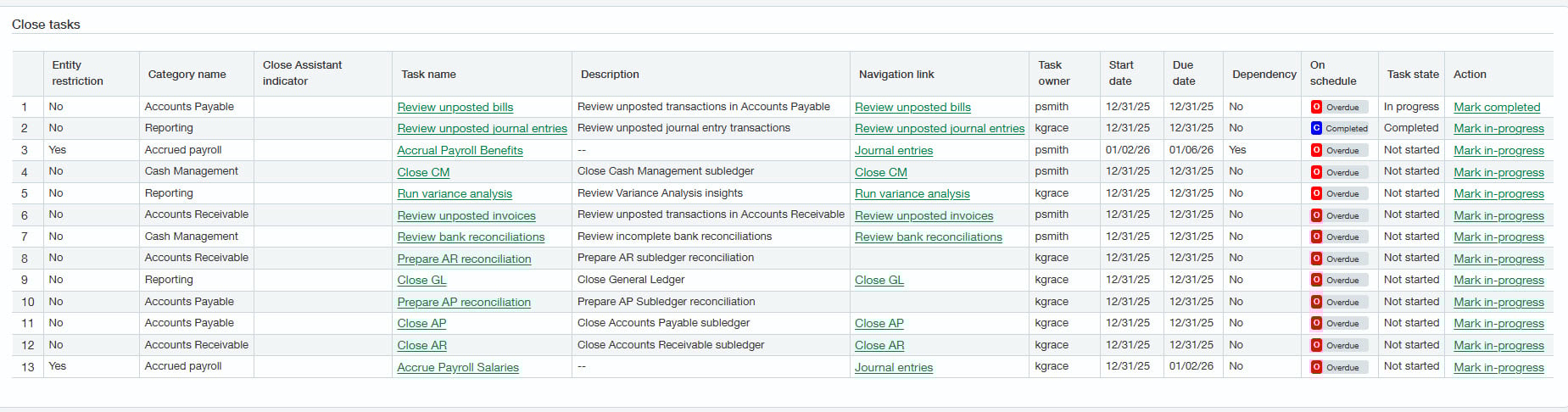
The Close Workspace also has a Close Progress Monitor where you can visually see your tasks on track, at risk, overdue, and complete. This gives you instant visibility to where you are at in the close process.
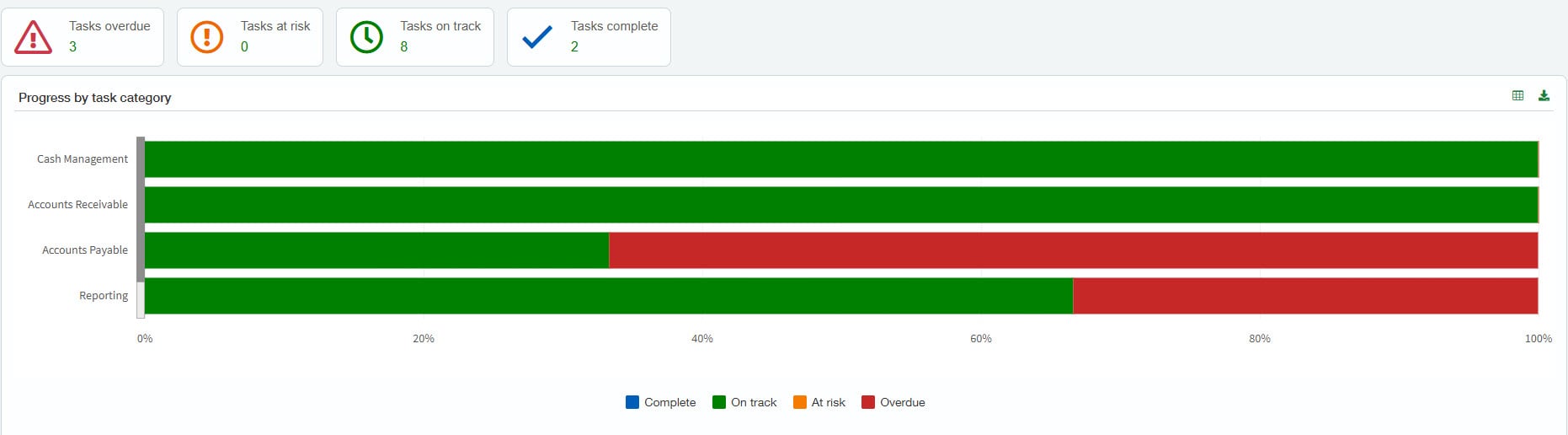
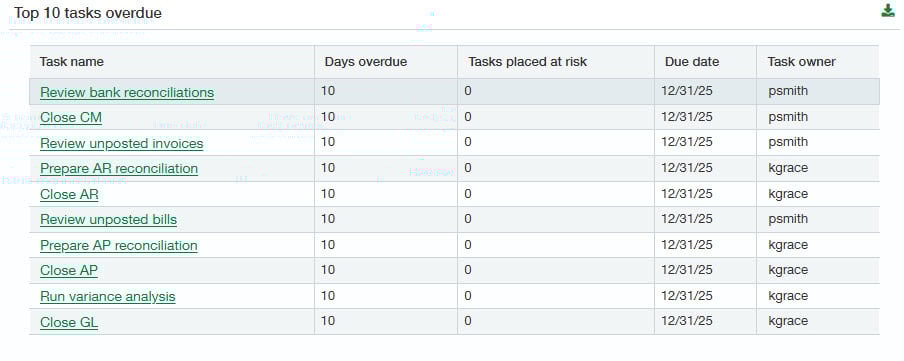
Close Workspace helps schools save time and have a consistent close process.
Unlocking efficiency: The power of embedded AI in Sage Intacct
By leveraging AI embedded in Sage Intacct, schools can help automate routine financial tasks, reduce errors, and gain faster, deeper insights into their financial operations. Tools like Close Assistant and Close Workspace further streamline the month-end close process, providing transparency, organization, and real-time progress tracking for finance teams. The seamless integration of AI into Sage Intacct empowers staff to work more efficiently and focus on strategic priorities, ultimately elevating the impact of their work.
How CLA can help schools be more productive using AI
- Interested in enabling these features or learning more about Sage Intacct for schools? Reach out to CLA's Sage Intacct team and join our webinar, Streamline Your School’s Financial Close With AI‑Driven Support on February 10 at 11 a.m. CT.
- If you are feeling overwhelmed about how to implement AI at your school to elevate your school’s financial operations, check out CLA’s AI Readiness Assessment and How Artificial Intelligence is Transforming Business Operations.
- Also follow our 2026 Sage Intacct Monthly Webinar Series and Sage Intacct blog for more helpful resources.