

Sage Intacct offers a range of AI solutions to help you automate your school's processes, improve accuracy, and make data-driven decisions.
Are you using artificial intelligence (AI) to enhance your school's financial processes, reporting, and analysis? Are you even aware of all the various AI-powered options available to improve your school's financial operations?
Sage Intacct, the only cloud-based accounting software preferred by the AICPA, offers a range of AI solutions to help you automate your school's processes, improve accuracy, and make better data-driven decisions.
Financial reporting challenges schools face
Before we dive into Sage Intacct’s AI-powered capabilities, let’s talk about the reality many schools are dealing with:
- Lack of real-time data for the finance team and budget managers to make decisions
- Too much time spent generating financial reports and not enough time analyzing financial data
- Manual, error-prone financial processes that could easily be automated
- Long monthly close process
- Limited visibility to entire school operations because data is scattered across different systems and spreadsheets
What is artificial intelligence (AI)?
AI isn’t just a buzzword. It’s a set of technologies that can perform tasks typically requiring human intelligence — like recognizing patterns and making decisions. Think of it as your tireless digital assistant that handles the repetitive tasks without complaint. Plus, it doesn’t need an annual salary, health insurance, or performance reviews!
Within AI, machine learning is when computers learn from data to make decisions or predictions. Generative AI creates new content, like text, images, or sounds, based on prompts or existing data. Let’s explore how schools can use AI and machine learning in Sage Intacct to elevate financial operations.
AI in school finance – Accounts payable automation
Accounts payable invoice automation is one way many schools are already leveraging AI. If someone on your finance team is still manually entering invoices and cutting checks, accounts payable automation is an excellent first step into AI. It's a great starting point if your finance team struggles to input and code vendor invoices accurately and promptly. The ROI is easy to justify with the reduced hours needed to enter bills and pay vendors each month.
In Sage Intacct, vendor invoices can be submitted by email or imported directly into the system. Sage Intacct identifies the vendor, extracts invoice data, and codes dimension details such as the general ledger account, school, and department, and creates the invoice for you. This eliminates manual data entry, speeding up processing and reducing errors. If relying on technology to enter data into your accounting system scares you, don’t worry! Draft invoices are created for you to review data prior to posting.
If you use a purchase order process in Sage Intacct, AI-powered automation can match vendor invoices to purchase orders. Again, the system creates a draft invoice, so you can review and make corrections as needed. Any corrections you make to the draft invoices are fed back to the AI engine. AI uses machine learning technology to improve, learning from the corrections and getting better at drafting invoices more accurately over time.
Sage Intacct Outlier Detection
The General Ledger module in Sage Intacct offers an AI-powered tool known as GL Outlier Detection, designed to enhance the accuracy of financial transactions through machine learning. It reviews journal entries and flags those diverging from established patterns, helping users identify potential errors before entries are posted. As the system processes more data, its ability to detect anomalies improves over time.
By default, flagged anomalies are routed to the journal entry approver, but you can configure the system to return flagged entries to the submitter instead. This allows the submitter to review, adjust, and resubmit the entry as needed. Additional configuration options include setting a materiality threshold and narrowing the analysis to specific dimensions such as department, school, or project.
Smaller schools may face challenges in segregating duties compared to larger education institutions. Even without distinct submitter and approver roles, GL Outlier Detection can still be used effectively. Simply enable Outlier Detection with Journal Entry approval and select the option allowing users to approve their own entries.
Let’s explore an example of how GL Outlier Detection functions in Sage Intacct for an organization with five entities — four representing individual schools and a fifth dedicated to tracking centralized office expenses. Let’s say a user in the business office books a monthly accrual for professional fees for the human resources department as shown below. Since this transaction consistently posts to the same account, department, and entity, no anomalies are flagged by the system.

Now imagine it’s later in the year and there has been some staff turnover. A new accountant, unaware this expense should be accrued to the centralized office, mistakenly assigns it to a specific elementary school. When she submits the journal entry, GL Outlier Detection flags the entry with an anomaly labeled “coding,” and returns it to her for review as shown below.

By hovering over the “coding” label, the accountant sees that Sage Intacct has flagged the School 1 – Elementary School as an anomaly, since these expenses are typically coded to the centralized office. Now she can update the journal entry and resubmit it. Similarly, if an accrual for professional fees is coded to a department that hasn’t previously incurred such expenses, the system may flag that as an anomaly, too.
This AI-powered technology takes a proactive approach to identifying potential errors or fraudulent activity early, helping to safeguard your school’s financial integrity. It also significantly reduces the time approvers spend manually reviewing journal entries.
Sage Intacct Copilot Variance Analysis
Real-time visibility to your financial data is one of the strengths of Sage Intacct’s financial reporting and dashboards. Copilot Variance Analysis takes this real-time visibility to the next level using AI-generated, audit friendly explanations for variances between actuals and budgets.
If it takes you a while to close your books, you're not alone! Waiting to review variances between actuals and budgets well into the following month can delay the monthly close process even longer. If your close process is delayed, decisions are being made based on outdated financial data.
With Copilot Variance Analysis in Sage Intacct, you can leverage AI to quickly summarize variances between actual and budget on demand and dig into the variances for more details. Notifications can be sent with real-time financial insights, notifying users when actuals exceed budget. Notifications can be sent to finance leaders with unrestricted access, such as the CFO or to budget managers responsible for a specific department or groups of departments, for example.
Copilot Variance Analysis use case: Preparing for a finance committee meeting
Let’s say it’s early September. Your team has wrapped up entering August’s transactions, the books are closed, and you’re gearing up for a finance committee meeting later this week. You’re short on prep time and you’ve got a long to-do list (sound familiar?).
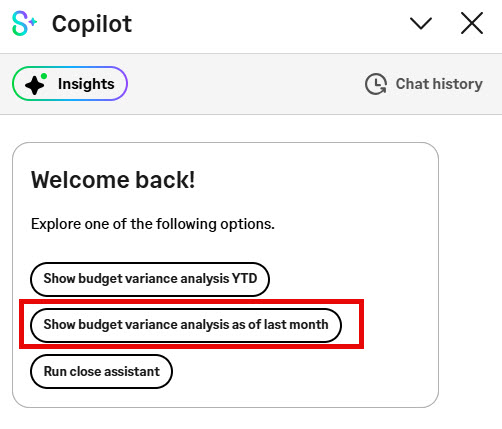
Once you click on the Copilot icon in Sage Intacct, you will be prompted to choose from some predefined prompts. Since it’s September, and you want to see the analysis as of August 31, you click on “Show budget variance analysis as of last month.”
Instantly, you get a snapshot of total revenues, expenses, and surplus (or deficit) as of August 31 as shown below. You can then choose from three prompts at the bottom to dive deeper into the analysis.
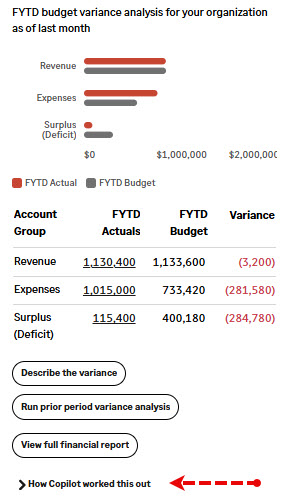
Not sure you trust AI yet? Have no fear! Click on “How Copilot worked this out” to see where the source data came from. Want to double-check? Run the report manually and validate the numbers yourself.
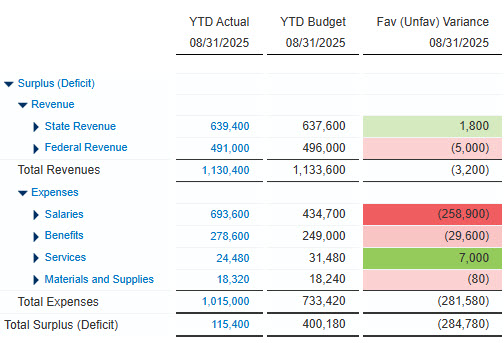
Selecting “View full financial report” opens the underlying financial report configured to work with Copilot. You can filter it, drill into transactions, and customize the level of detail you want displayed — whether you want a high-level summary or granular account-level data.
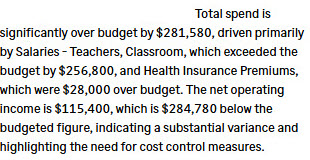
Another helpful prompt is “Describe the variance.” This is a great one for prepping for your finance committee meeting — it gives you a written summary of the variances. Below is an example of the AI generated text of the expense variances shown in the report above. Copy and paste into your slide deck for the finance committee and you are ready to go.
Copilot Variance Analysis isn’t just for CFOs and controllers. Budget managers overseeing one or more departments can use it, too. For example, an administrator responsible for Departments 100 and 110 can click a prompt to view insights for Department 100 as shown below.
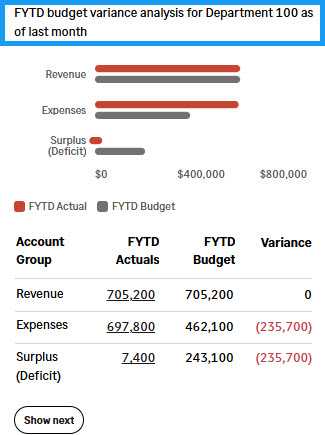
Clicking “Show next” reveals similar information for Department 110.
Future of AI in Sage Intacct
AP Automation, GL Outlier Detection, and Copilot Variance Analysis are just the beginning of AI in Sage Intacct. Here are a few more AI-driven tools already available in Sage Intacct:
- Close Assistant — Provides proactive monitoring of standard month-end close tasks
- Subledger Reconciliation Assistant — Streamlines Accounts Payable and Accounts Receivable reconciliations with real-time variance detection
- Search Help
Looking ahead, Sage Intacct is developing Close Workspace, a new feature designed to bring consistency, control, and efficiency to the monthly close process.
And there’s more — back in June, Sage announced it will be using AICPA resources for training Sage Copilot. This collaboration is the first of its kind and marks a major step forward in combining trusted accounting standards with cutting-edge AI.
How CLA can help schools be more productive using AI
Interested in enabling these features or learning more about Sage Intacct for schools? Reach out to CLA's Sage Intacct team or submit the form below, and join us for our upcoming complimentary webinar AI-Powered Productivity for Education Leaders and the Power of Sage Intacct.
If you are interested in learning more about how you can embrace a digital approach to elevate your school’s financial operations, check out CLA’s Digital Readiness Assessment and How Artificial Intelligence is Transforming Business Operations.
To learn how Trinity School enhanced their financial operations, check out this case study Trinity School Automates Reporting with Sage Intacct.
Also follow our 2025 Sage Intacct Monthly Webinar Series and Sage Intacct blog for more helpful resources.