

Schools can significantly save time on grant reimbursements by automating the process with Sage Intacct's Grant Tracking and Billing module.
Does your school rely on spreadsheets, shared folders with backup documentation, and manual reimbursement worksheets to manage cost-reimbursement grants such as Title I, school nutrition, security or transportation grants? If so, you’re not alone.
Grant tracking can quickly become one of the more complex areas of the business office regardless of the grant type. Schools can significantly reduce the time spent on grant reimbursements by automating the process with Sage Intacct's Grant Tracking and Billing module.
Why grant tracking is challenging for schools
Schools often manage several types of cost-reimbursement funding at the same time for various grants and awards. Each funding source may come with its own reporting period, spending deadline, budget categories, required documentation, and reimbursement process. This complexity creates these common pain points:
- Knowing what’s been spent against each grant or funding source
- Identifying which expenses are allowable and reimbursable
- Tracking what’s already been billed and what’s still waiting to be billed
- Managing multi-year grants or awards crossing fiscal years
- Calculating indirect costs or overhead based on grant-specific rules
- Compiling support for funders, auditors, and compliance reporting
- Preparing reports such as grant budget-to-actuals or Schedule of Expenditures of Federal Awards details
When these steps are managed manually, the process can become time-consuming and difficult to review. It also increases the risk eligible costs are missed, nonallowable costs are included, or documentation is difficult to locate when questions arise.
Connecting grant costs to reimbursement billing
At a high level, Sage Intacct’s Grant Tracking and Billing module connects three important parts of the process: The grant or funding source record, the transactions coded to that funding source, and the reimbursement invoice or billing request generated from those transactions.
The Grant Tracking and Billing module is built on Sage Intacct's Project dimension, which can be renamed to align with your school's terminology. Many schools rename this dimension to Grant or Funding Source. I will refer to it as the Grant dimension during the remainder of this blog.
Capture key grant and award information
The grant record has several different tabs available and can become the central place to store key details such as funder award dates, contract amount, billing type, status, and various reporting attributes. The first tab captures the basic information about the grant as shown below.
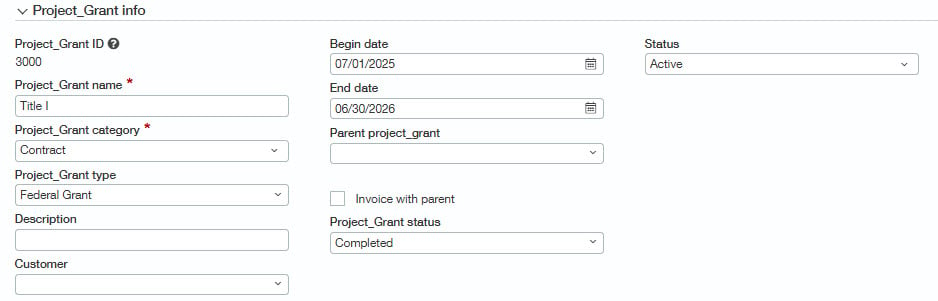
The Grant status field can help reduce the risk of new activity being coded to a complete or inactive grant. That may seem like a small control, but it can prevent cleanup later in the billing or reporting process. You can also customize the status settings to prevent specific transaction types from being entered or invoices from being generated.
If your school is required to produce a Schedule of Expenditures of Federal Awards (SEFA), you can capture the Assistance Listing Number (ALN) in addition to the agency responsible for funding and other necessary fields as shown below.

Tip: Need to track additional attributes? As with any dimension, you can also easily add custom fields to your grant dimension for tracking additional information relevant for your school.
Capture grant costs as they occur
Once a grant is set up, reimbursable transactions can be coded directly to the grant when entered. Accounts Payable, Purchasing, and Employee Expense transactions can also be set to default as billable.

The billable flag is what connects transaction entry to reimbursement billing. When a transaction, such as a vendor bill, is coded to a grant and marked as billable, the transaction becomes available to bill when the invoice is generated.
This is where the module can create real efficiency. This allows the finance team to capture reimbursable costs during the normal transaction workflow instead of searching for them after the fact.
Streamline reimbursement billing
The Generate Invoices process gathers the qualified, unbilled transactions and prepares them for review and billing. That means the reimbursement process is no longer starting from a blank spreadsheet. It starts with the transaction details already in the system.
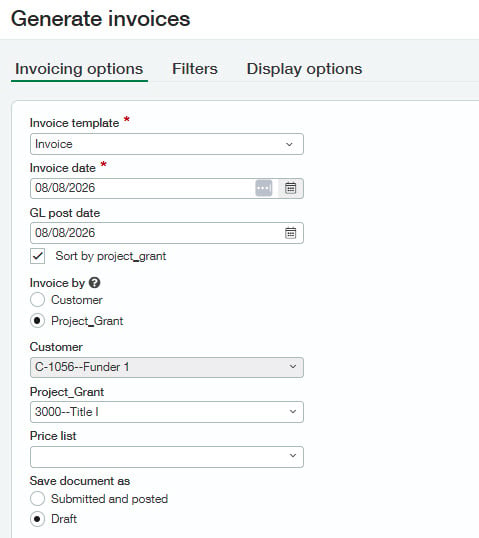
Before billing, reviewers can drill down from the preview billing screen shown below to the underlying transactions and source documents. This helps validate costs, identify exceptions, and improve visibility into expenses marked for reimbursement.
After review, the system can generate either draft invoices or posted invoices for submission to the funder. Additional attachments can be added to invoices after they are generated if needed.
Invoice preview
 A pre-bill report provides a similar view with additional filters and fields. Schools can use it to review billable activity for all grants or a subset of grants before invoices are generated.
Source documentation
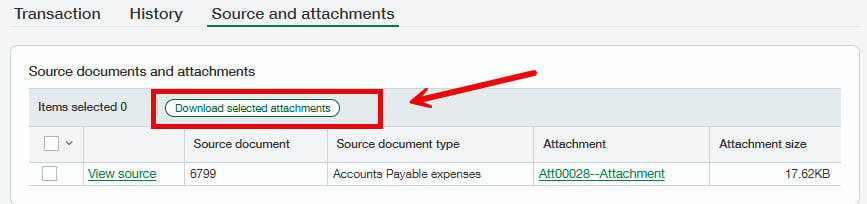
Attachments added to source documents, such as vendor bills or journal entries, can pull through to the invoice when generated through the Grant Tracking and Billing module. From the invoice, open the Source and attachments tab to review or download supporting documentation. You can download attachments individually or select multiple files and then click on Download selected attachments.
Support compliance and audit readiness
Grant compliance extends beyond submitting reimbursement invoices. Schools must be able to demonstrate what was spent, why the costs were allowable, how they relate to the award, and where supporting documentation is maintained.
Grant Tracking and Billing helps streamline compliance by linking reimbursement invoices to the underlying transactions and supporting attachments. For schools subject to single audit requirements or other grant reporting obligations, keeping grant details, award attributes, transaction activity, and documentation within a single system can simplify reporting and audit preparation.
Pair Grant Tracking and Billing with Dynamic Allocations module
For schools with more complex grant requirements, Grant Tracking and Billing may be even more powerful when paired with the Dynamic Allocations module which can allocate salaries, benefits, overhead, or indirect costs to grants using financial or statistical drivers. Allocation entries can then be marked as billable when appropriate.
How CLA can help schools use Sage Intacct
By connecting grant setup, transaction coding, reimbursable costs, invoice generation, and supporting documentation, schools can create a more efficient, repeatable, and auditable reimbursement process using Sage Intacct’s Grant Tracking and Billing module.
Whether you're managing federal grants, state funding, awards or other funding sources, this module can help streamline reimbursement billing and related reporting. It can also support fixed fee or fixed fee-plus-expense grant billing when needed.
- Looking for more information on Grant Tracking and Billing? Check out our on-demand webinar Grant Tracking and Billing with Sage Intacct.
- Need help with grant tracking, reimbursement billing, reporting, or learning more about Sage Intacct for schools? Reach out to CLA's Sage Intacct team.
- Also follow our 2026 Sage Intacct Monthly Webinar Series and Sage Intacct blog for more helpful resources.