

Bank files are replacing ACH in Sage Intacct in 2027. See this and other R3 and R4 updates, including prepaids and a more secure way to login with passkeys.
Did you know Sage Intacct will be retiring ACH files to pay vendors and employees in 2027, replacing them with bank files? Learn how to get ahead of that transition, plus other R3 and R4 features that may have slipped under the radar, such as prepaids in AP, billing groups in Order Entry, passkey sign-in, AP anomaly detection, and connected Excel reporting.
R3: Billing groups in Order Entry and invoice previews
Billing groups is a newer functionality available in Order Entry allowing bulk creation of Order Entry invoices. When you need to bill a group of customers on the same schedule for common charges, you can now create these invoices in bulk.
For example, let’s say you have a one-time in-person training event you’re offering in February 2027 which you plan to invoice on January 2 when enrollment closes. Instead of importing invoices for customers attending the in-person training, or creating invoices one at a time, you can simply add them to a customer group or billing group to be included in the scheduled January 2 invoice group.
Not only does this functionality work for one-time future events, it’s also well designed for recurring invoicing for the same amount and cadence.
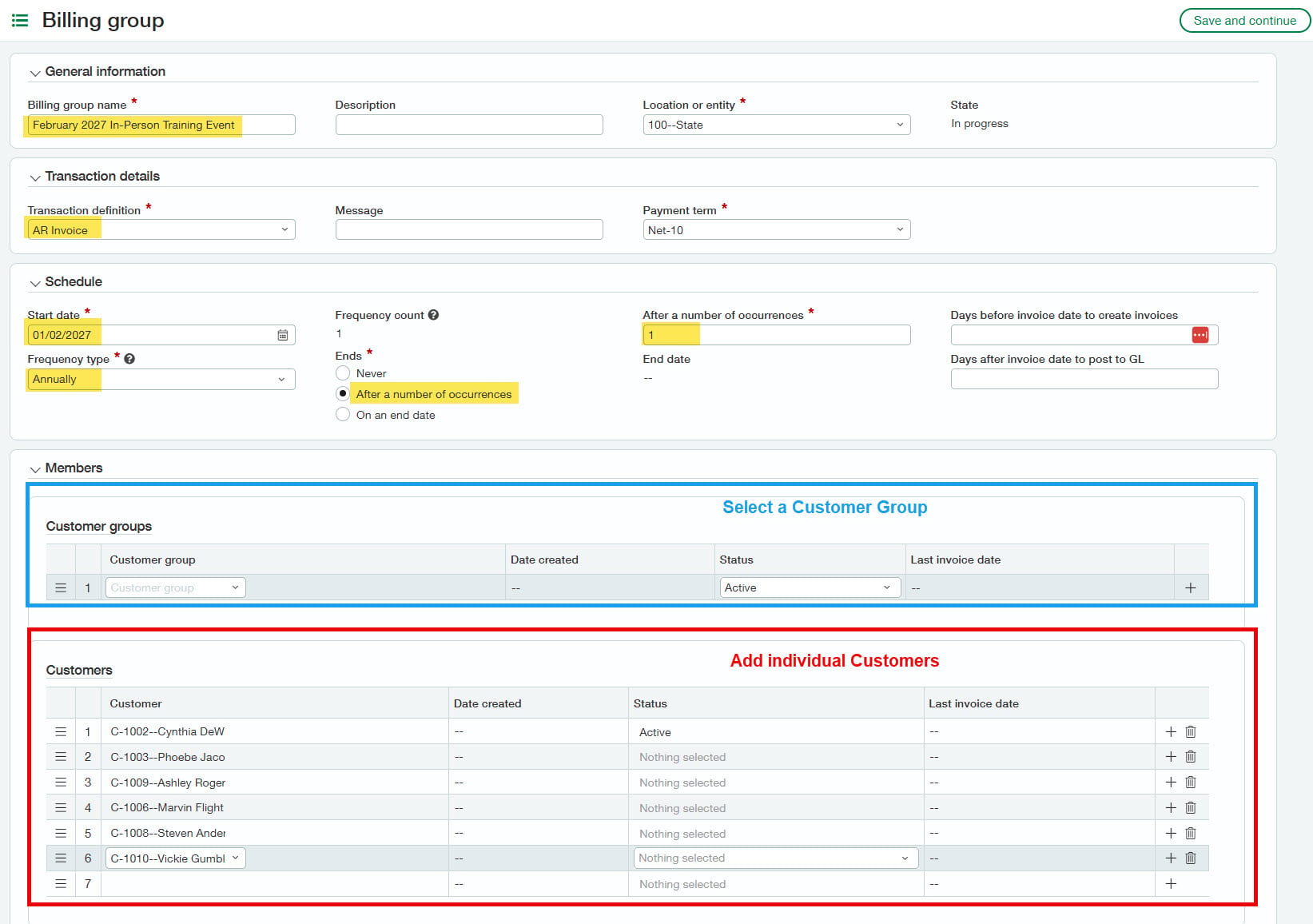
1. Create the billing group:
This tab determines the frequency of billing and which individual customers or groups of customers (dimension group) should be billed as part of this group.
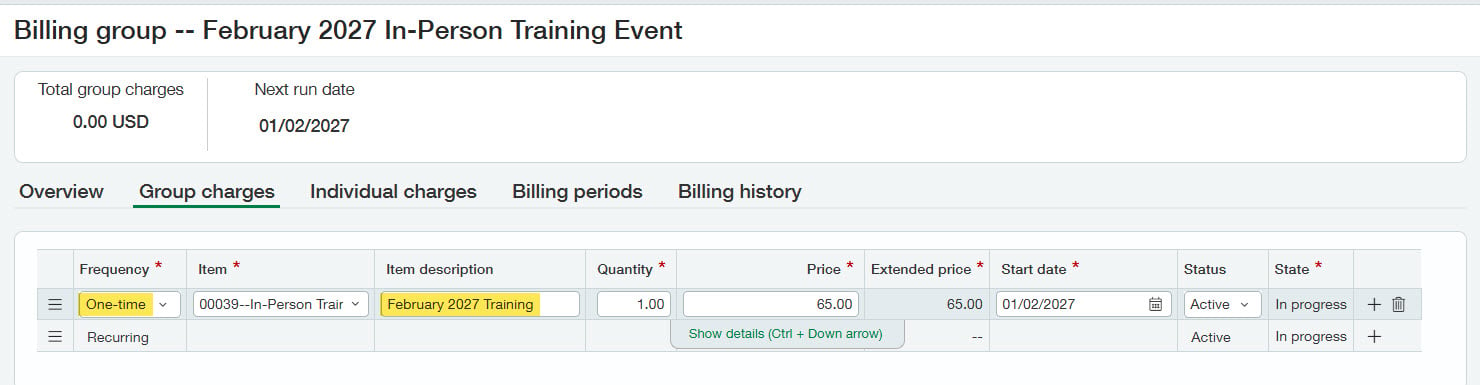
2. Add group charges:
Here you can add the line items of the invoices. In this example, we’ll add our one-time training for February 2027 for $65 per person. However, you can also add recurring charges, like a monthly subscription fee.
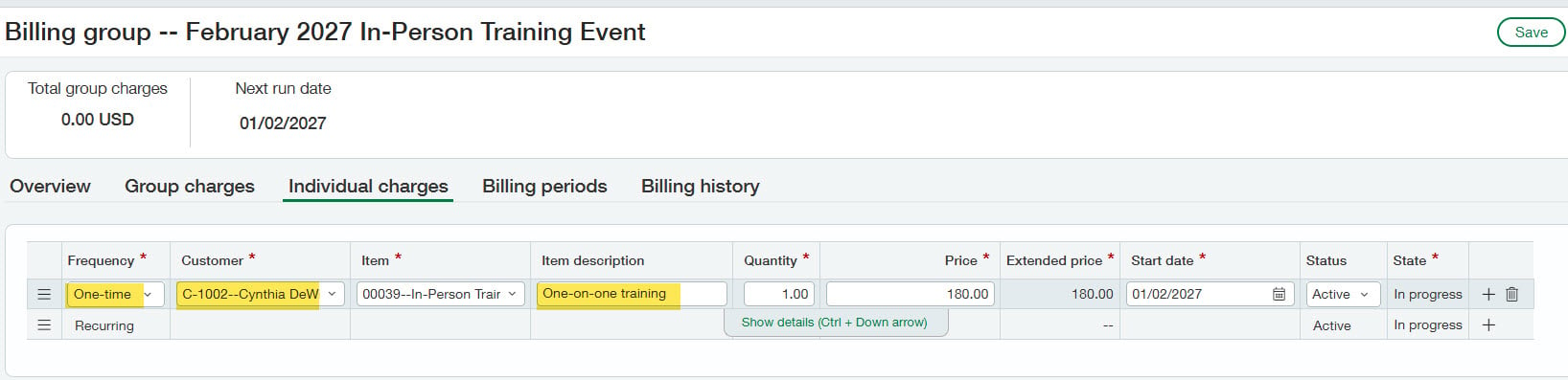
3. Add individual charges:
If any customers have additional charges applied, perhaps they’ve chosen to add on to the event by attending pre-event training, in addition to the group charges you can add this on the individual charges tab.
Once your billing group has been created, you can preview the invoice for a particular customer to check your work by clicking Order Entry > Preview Invoices. Below, you can see Cynthia’s invoice which includes both the group charge and the individual one-on-one training charge.
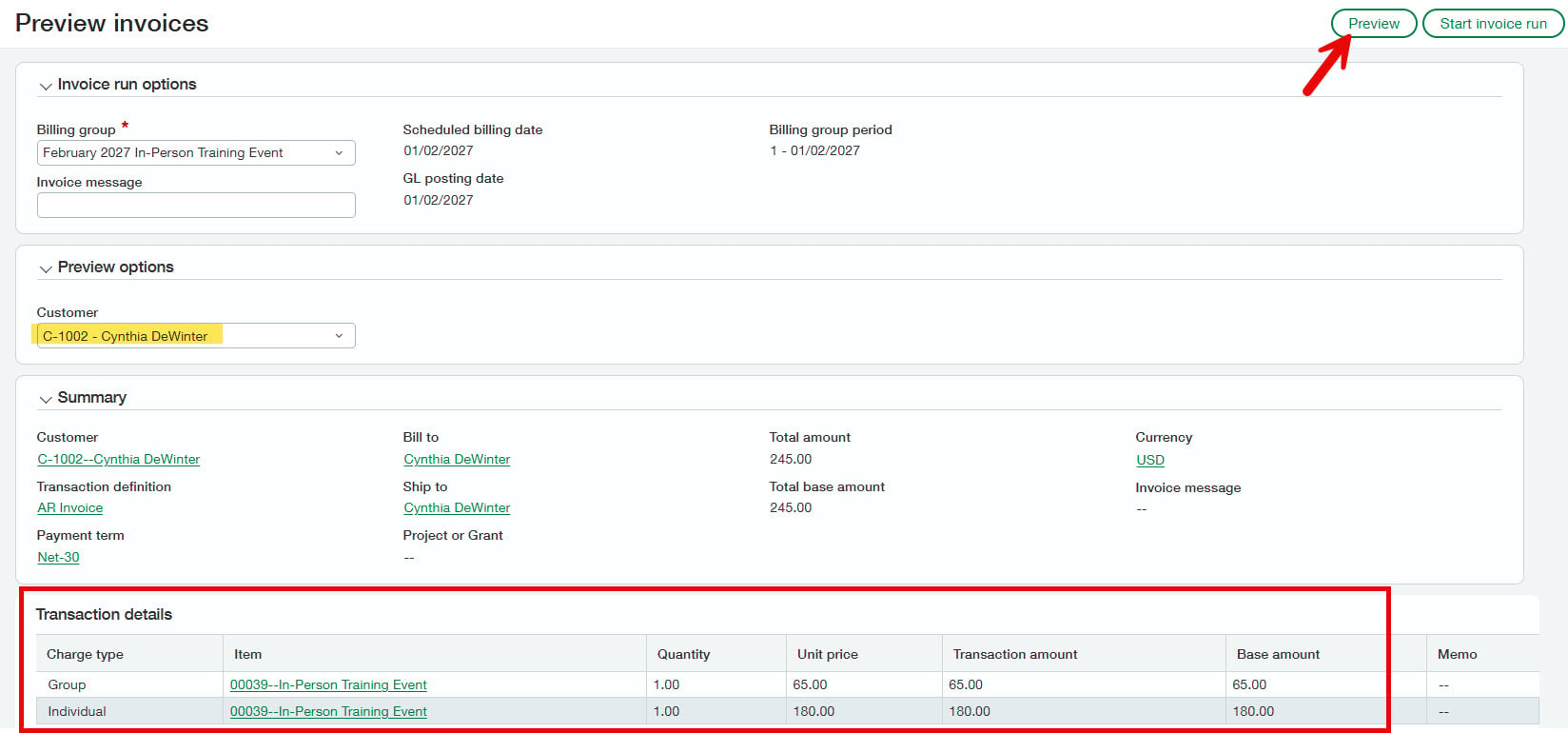
From this page, you can also generate all invoices ahead of the scheduled run-time.
Helpful tip: The billing group will save even if all required dimensions aren’t selected on the group or individual charges. To prevent batch invoice failure (or having to re-create the billing group) make sure all dimensions required on your revenue accounts are populated.
R3: Anomaly detection in Accounts Payable
If you’ve enabled AP automation in Sage Intacct (the ability to upload or email a PDF and have the system automatically create a draft bill), you can now add a new column for “anomaly” on the automated transaction list view.
When transactions are processed through AP Automation or Purchasing, Sage Intacct can now detect:
- Unusual transaction amounts
- Unrecognized vendor email addresses
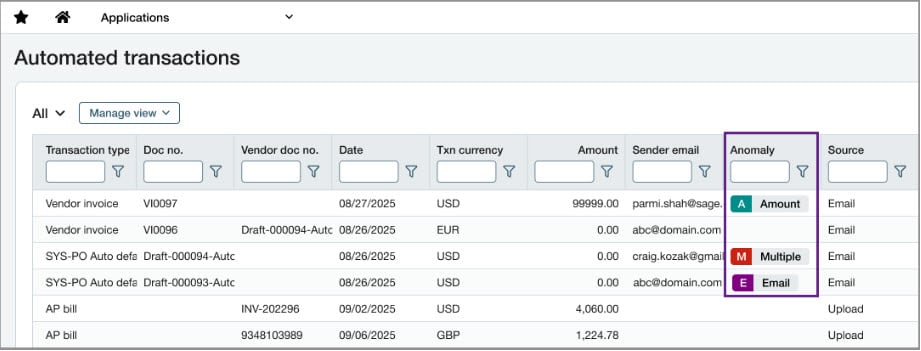
While the anomaly column doesn’t appear in the list view by default, we recommend adding it to help detect potential fraudulent transactions.
For more step-by-step information on creating custom list views, check out this help article.
R3: Prepaid expense amortization automation in Accounts Payable (early adopter)
Prepaids functionality is now available within the Accounts Payable module for enablement. There’s no additional subscription cost. Simply enable and configure the new functionality and start using it for new bills for prepaid expenses.
1. Create a prepaid journal
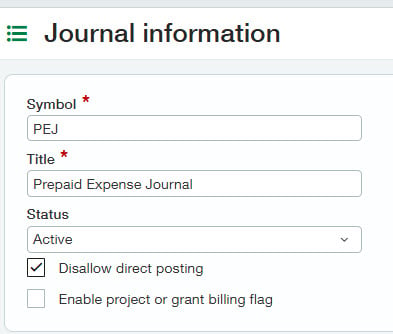
2. Enable prepaids in Accounts Payable
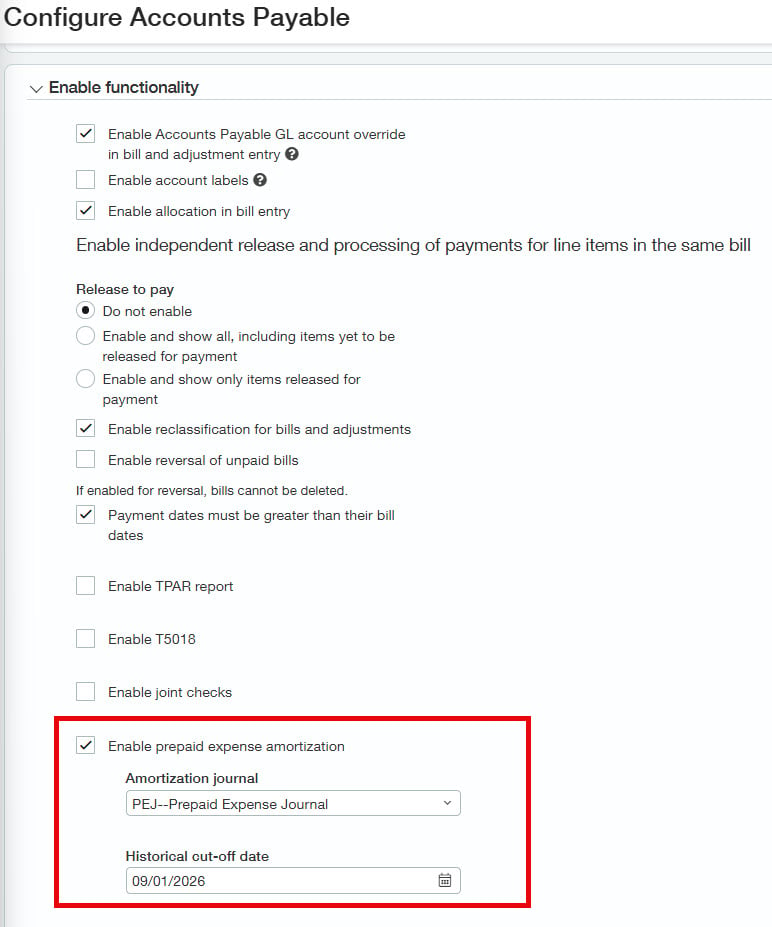
Periods associated with a new prepaid schedule that fall prior to the historical cut-off date aren’t posted by the amortization process.
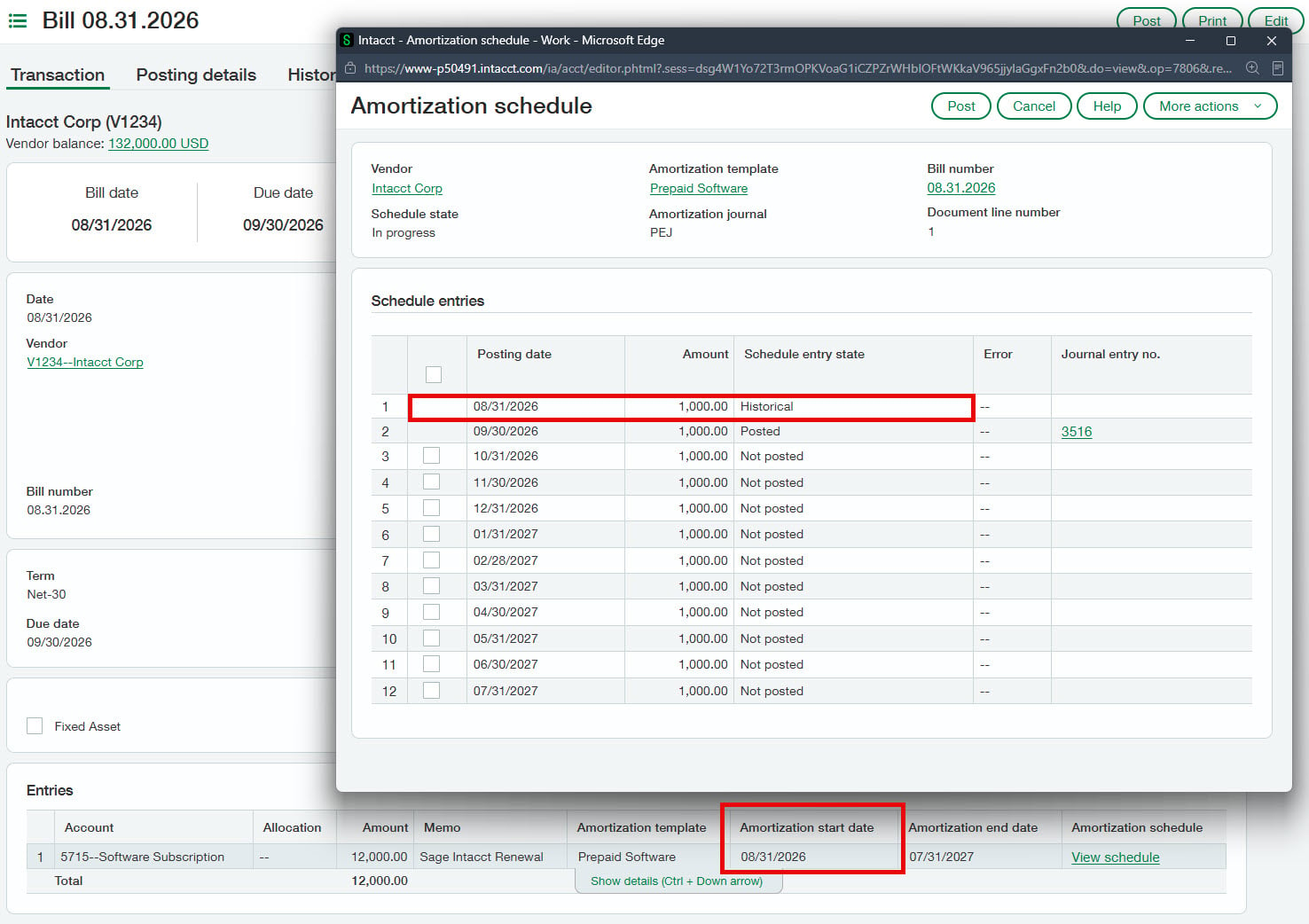
3. Create amortization templates
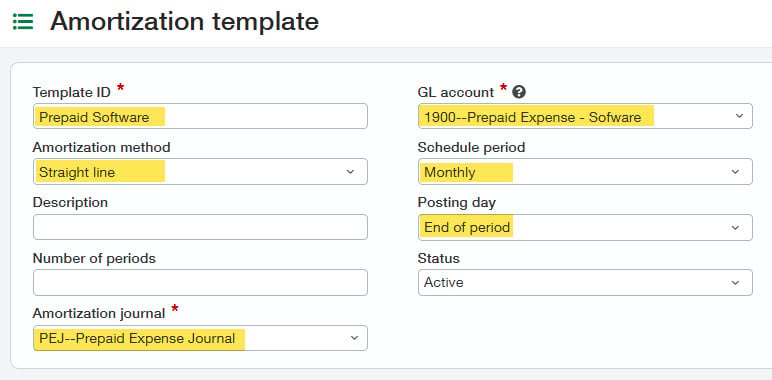
Note that when posting an AP bill, the user will select the expense account and an associated prepaid template. Sage Intacct will then post the AP bill to the prepaid account associated with the template and create a schedule that debits the expense account from the AP bill and credits the prepaid account from the template.
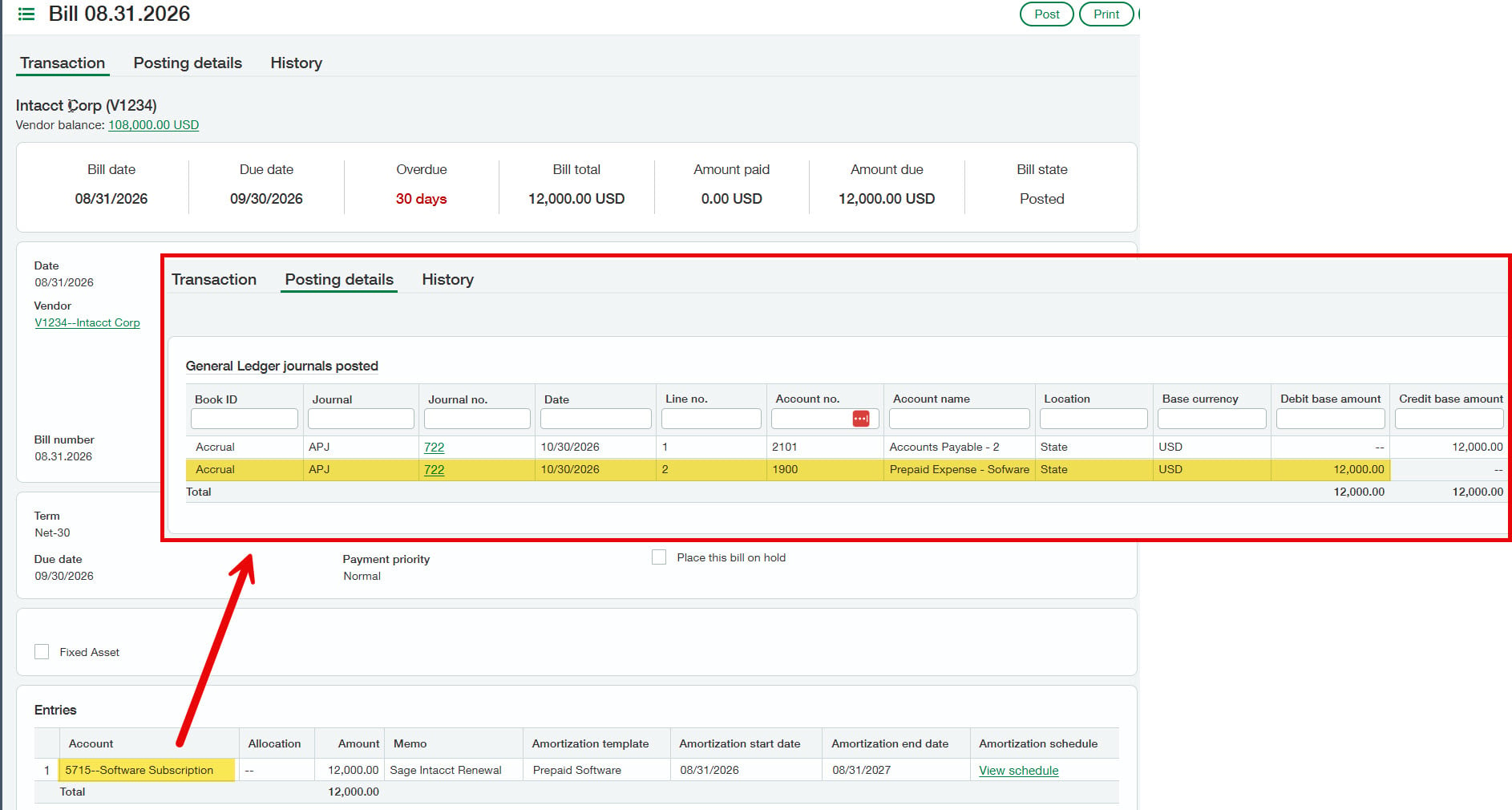
This is very different from how the existing prepaid module works, so it’s worth testing in a sandbox as there really is no “undo” or “unpost” for prepaid entries from schedules.
Also, keep in mind this functionality is in early adopter, so it’s subject to change and worth waiting for general availability especially if you have a higher volume of prepaids.
R4: More secure sign-in with passkey authentication
If you’re not using single sign-on (SSO) to log in to Sage Intacct, you now have a new more secure method available for logging in — passkeys.
What are passkeys? Passkeys are a password-less way to log in that are resistant to phishing because they use cryptographic keys stored on your device.
To enable, your system administrator will need to turn on the functionality within Company > Setup tab > Company > Security
Once enabled, you may register a new device passkey or continue to use your user ID and password when needed. Since we’re on the topic of security, did you know CLA has a team of ethical hackers? They’re part of our cybersecurity service offered at CLA and can help strengthen your organization’s security.
R4: Connected reporting for Excel (early adopter)
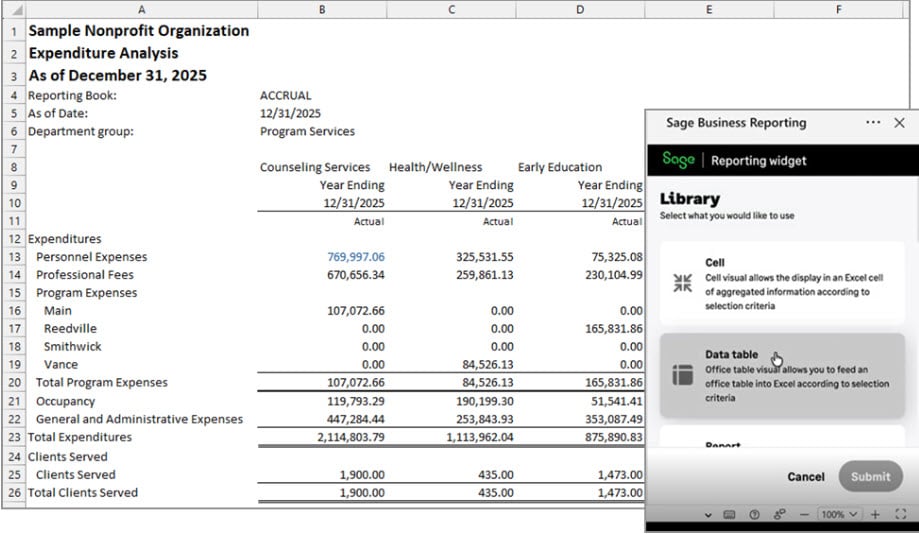
No matter how much adoration you may have for Sage Intacct’s report writing capabilities, there are some things that are only possible in Excel, so breaking up with Excel entirely is hard to do. You can now join the early adopter program which allows for pulling Sage Intacct data directly into Excel, so you can build reports using native Excel functions with a direct feed of data from Sage Intacct, refreshable on the fly.
For access to the early adopter program, register here.
R4: Bank files replacing standard ACH in 2027
If you’ve been using the standard ACH file, you’ll need to migrate to the new bank file process next year. The general workflow for paying vendors is the same as ACH file payments, but bank files are meant to improve the efficiency and accuracy of payment files uploaded to the bank.
How do I know if I’m using the ACH file and not bank file? If you’re using ACH files, when you download your payment file, you would go to: Accounts Payable > Payment Files > ACH file generation or Cash Management > ACH file generation
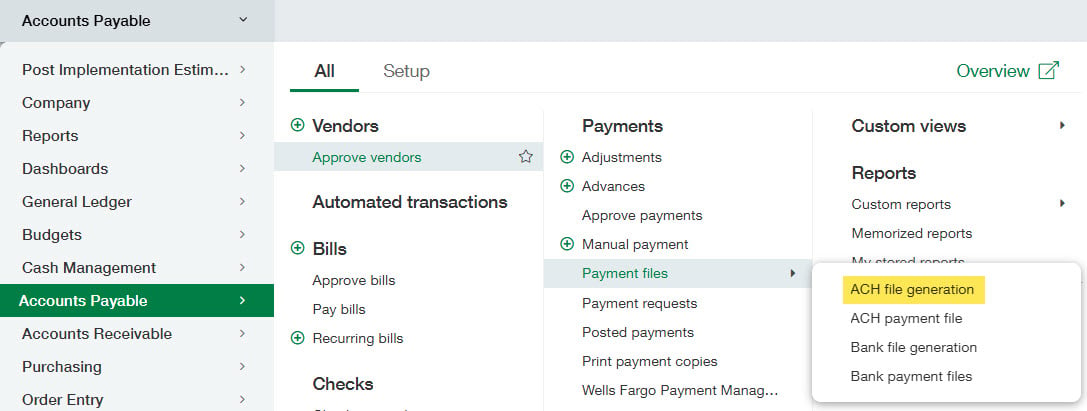
To get ahead of this functionality’s retirement, follow these high-level steps to transition now:
- Export checking account bank details, vendor bank details, and employee bank details
- Subscribe to Bank Files under Company > Admin > Subscriptions > Sage Cloud Services
- Update individual checking accounts from “Enable ACH payments” to “Enable bank file payments”
- Update Vendors and Employees with bank file details
Helpful tip: You can use an import file to import bank file payment details for vendors and employees in bulk. More in-depth details on migration and setup of Bank Files can be found in Sage Intacct’s help.
How CLA can help with new Sage Intacct features
Watch our R3 webinar recording, then join our team for a live complimentary webinar on December 15 where we’ll cover these along with many other Sage Intacct R4 release highlights.