

For finance teams looking to reduce risk, improve visibility, and gain insight, Sage Intacct’s Close Automation helps modernize the close.
For many finance teams, the month‑end close is still one of the most stressful and time‑consuming processes of the accounting cycle. Manual reconciliations, disconnected spreadsheets, late surprises, and unclear ownership of tasks can all slow progress and increase risk. Sage Intacct’s Close Automation capabilities are designed to help that.
Close Automation is a set of AI‑powered tools within Sage Intacct streamlining, standardizing, and accelerating the period‑end close by improving visibility, automating manual tasks, and surfacing issues earlier in the process.
At the center of this solution are four key components: Close Assistant, Close Workspace, Subledger Reconciliation Assistant, and Variance Analysis. Together, they help finance teams close faster, with greater confidence and control.
Explore the main components of Close Automation and how they can help to solve common challenges faced by finance team at each period close.
The four components of Sage Intacct Close Automation
1. Close Assistant: A guided view of close progress
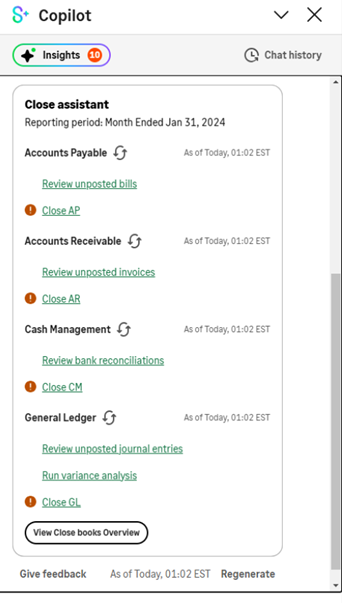
Close Assistant provides a centralized summary of close‑related activity across subledgers and the general ledger. Instead of navigating across multiple screens or reports, finance teams can see the status of key close tasks and unposted transactions in one clear view. This helps teams quickly identify what’s complete, what’s still in progress, and where attention is needed.
By simplifying navigation and highlighting close status across entities and subledgers, Close Assistant helps reduce time spent tracking down information and keeps the close moving forward without unnecessary delays.
2. Close Workspace: A centralized close management hub
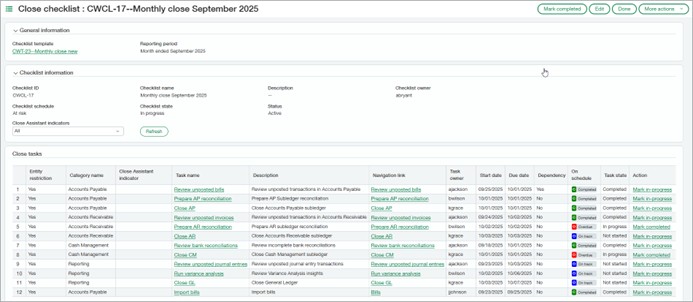
Close Workspace is the operational backbone of Close Automation. It provides a centralized environment for managing the entire close process using standardized checklists, task ownership, and progress monitoring. Teams can create reusable checklist templates for each period, assign responsibilities, and track dependencies across entities.
Managers gain a dashboard‑style view of close progress, allowing them to monitor completion status, identify bottlenecks, and reassign work if needed. This shared workspace replaces ad‑hoc spreadsheets and email chains with a structured, auditable process improving accountability and collaboration.
3. Subledger Reconciliation Assistant: Automated reconciliation without spreadsheets
Subledger Reconciliation Assistant automates one of the most time‑consuming steps of the close: Reconciling subledgers to the general ledger. Instead of exporting reports and manually comparing balances in Excel, this tool automatically prepares reconciliation reports and highlights discrepancies between subledgers and the GL.
The assistant provides drill‑down visibility into differences, helping teams quickly identify and resolve issues. By surfacing discrepancies earlier in the close, it reduces last‑minute scrambling and improves confidence in the accuracy of financial data.
4. Variance Analysis: Real‑time insight before the close is final
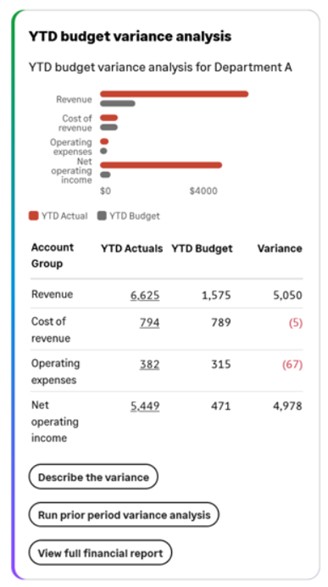
Variance Analysis delivers real‑time insight into budget‑to‑actual and period‑over‑period variances, allowing finance leaders to investigate discrepancies before the close is complete. Automated alerts notify users when expenses exceed budget, while visual dashboards make it easier to understand where and why variances occur.
The tool also supports drill‑down analysis and AI‑generated variance explanations, helping teams identify root causes and document explanations directly within the close process. This proactive approach reduces surprises at period‑end and improves the quality of financial reporting.
Common month‑end close challenges — and how Close Automation helps
1. Cutting long close cycles and delayed reporting
The problem: Many organizations still take weeks to close the books, delaying financial reporting and forcing leadership to rely on outdated information.
How Close Automation helps: Close Workspace replaces static checklists with dynamic workflows assigning owners, deadlines, and dependencies to close tasks. Real‑time dashboards show progress across teams and entities, allowing finance leaders to identify bottlenecks early and keep the close on schedule.
By centralizing close management and automating time‑consuming steps like reconciliations and variance analysis, Close Automation helps teams complete the close more efficiently and with greater predictability.
2. Phasing out spreadsheet‑driven close checklists
The problem: Manual close checklists live in Excel or email threads, making it hard to track ownership, provide consistency, or maintain audit readiness.
How Close Automation helps: Close Workspace turns the close into a shared, system‑driven process. Tasks are created and tracked directly within Sage Intacct, with clear accountability and status visibility. Checklists, supporting documentation, and discussions are all tied to the same records, reducing reliance on offline tools.
This structure improves consistency across periods and teams while making the close easier to manage, even when staff changes occur.
3. Catching errors before they become fire drills
The problem: Variances and reconciliation issues are often discovered late in the close or after reports are already distributed.
How Close Automation helps: Close Automation includes automated variance analysis and reconciliation support that flags issues earlier in the process. Finance teams can identify discrepancies between periods, budgets, and subledgers before the close is complete, allowing them to address problems proactively instead of reactively.
Issues can be documented and resolved directly within the close workflow, improving transparency and confidence in the final numbers.
4. Reducing manual work and finance team burnout
The problem: Skilled finance professionals spend too much time on repetitive, low‑value close tasks, increasing burnout and limiting capacity for analysis.
How Close Automation helps: Close Automation reduces manual effort by automating reconciliations, tracking task completion, and providing intelligent prompts . Instead of chasing updates or rebuilding reports, teams spend less time on mechanics and more time on review and insight.
By simplifying close administration, Close Workspace helps finance teams operate more sustainably without increasing headcount.
5. Improving visibility and accountability during the close
The problem: Controllers and CFOs often lack real‑time insight into close status, leading to constant check‑ins and last‑minute escalation.
How Close Automation helps: Close Workspace provides a single, centralized view of close progress across tasks, teams, and entities. Visual dashboards highlight overdue tasks, risks, and blockers, giving leaders the information they need without manual follow‑ups.
Integrated collaboration tools allow teams to communicate directly within close tasks, keeping conversations and documentation in context and improving audit readiness.
How CLA can help Sage Intacct users improve month-end close
For finance teams looking to reduce risk, improve visibility, and gain earlier insight into their numbers, Close Automation represents a meaningful step forward in modernizing the close. But improving the month-end close is only the beginning of what AI can deliver.
For organizations ready to explore what’s possible, a CLA AI Readiness Assessment is a great place to start, helping you define a clear, actionable roadmap to take your organization to the next level. If you’re ready to see what AI can do for your organization, let’s start the conversation today.