

Get practices for mastering bank reconciliation, including bank feeds and extending through effective rule design and issue troubleshooting.
Bank reconciliation is a core accounting process everyone understands but few truly correctly perform. When set up correctly, Sage Intacct’s bank feeds, rules, and reconciliation tools can dramatically reduce manual effort, improve accuracy, and give finance teams faster visibility into cash activity. When set up poorly, they can create confusion, duplicate work, and increase frustration.
Based on our experience supporting Sage Intacct users across industries, learn practical practices for mastering bank reconciliation — starting with bank feeds and extending through effective rule design and issue troubleshooting.
Start with the right bank feed setup
Before reconciliation even begins, success depends on how your bank feeds are configured.
Enable Sage Cloud Services
Sage Intacct bank feeds rely on Sage Cloud Services, which must be enabled at the Top Level. Once activated, users can securely connect bank and credit card accounts directly to Intacct and begin downloading transactions automatically.
Connect accounts thoughtfully
When connecting a bank feed:
- Select the correct bank connection (pay close attention when multiple options appear), confirming URL is the best way to confirm exact match
- Choose a start date carefully to avoid pulling in already reconciled transactions
- When reconnecting a feed, start with the first day of the next unreconciled period
These small decisions upfront can prevent hours of cleanup later.
Understand your bank connection options
Not all bank feeds are created equal. Sage Intacct supports several connection methods, each with its own benefits and limitations:
- File imports — A reliable fallback when direct feeds aren’t available
- Indirect connections — No cost, but limited by bank security requirements and potential inconsistency
- Direct connections — API- or SFTP-based connections offering greater stability and security
- Custom integrations (SIG) — Enterprise-grade solutions for high priority or complex banking relationships
In addition, third party services like AccessPay and FISPAN can help establish secure, direct connections for banks with API or SFTP methods, reducing the need for frequent reauthorization and tokenization.
If your bank is unsupported, our digital data and automation team has successfully built automated file transfers from a bank to SFTP site to Sage Intacct rather quickly.
Use bank transactions strategically
A common misconception is that bank transactions automatically impact the general ledger. They don’t — until you set them up.
From the Bank Transactions screen, users can:
- Ignore or unignore zero-dollar, duplicate, or delayed transactions
- Use More Actions to create transactions directly from bank activity
- Record one-time or ad hoc transactions not requiring AP or purchasing workflows
This approach is especially useful for customer receipts, refunds, or transactions not justifying long term automation.
Create Rules vs. Match Rules: Apply the right automation
Rules are where Sage Intacct delivers significant efficiency gains — but only when used correctly.
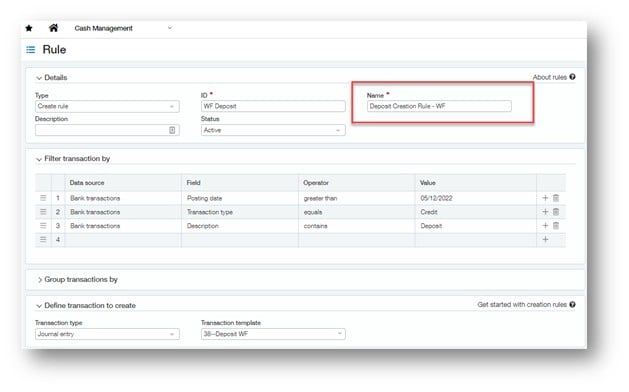
Create Rules
Create Rules automatically draft journal entries or credit card transactions based on bank feed data. They’re ideal for:
- Bank fees and interest earned
- Credit card charges
- Transfers, refunds, and cash back
- Other recurring, non-subledger transactions
Transactions created through Create Rules automatically match during reconciliation, significantly reducing manual effort.
Match Rules
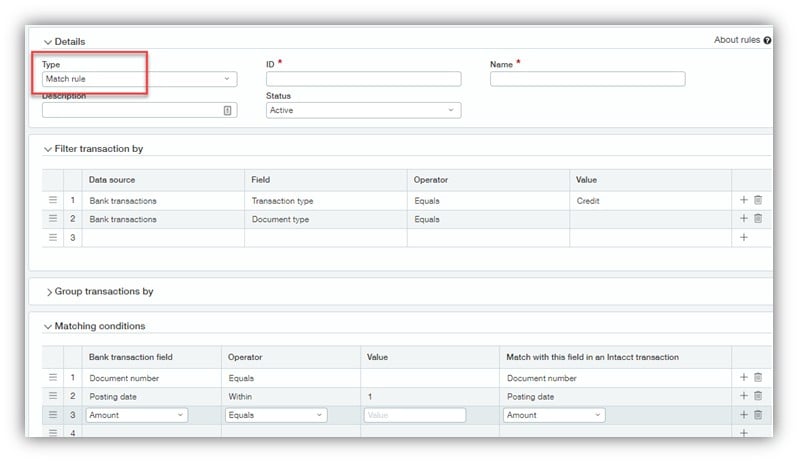
Match Rules are suited for transactions already existing in Intacct and need to be matched to bank activity, including:
- Vendor payments
- Payroll checks and ACH
- Charge payoff payments
A key strategy is rule order: Place your most specific “sniper” rules first and broader rules last to avoid incorrect or missed matches.
Be prepared for common bank feed issues
Even with strong setup and automation, bank feeds can present challenges. Common issues include:
- Authorization or reauthentication requirements
- Missing or delayed transactions
- Duplicate transactions
- Timestamp discrepancies between the bank and Intacct
- Create Rule transactions appearing as unmatched
Understanding which issues are expected versus those requiring intervention helps teams resolve problems faster and reconcile with confidence.
How CLA can help with bank reconciliations in Sage Intacct
Bank reconciliation doesn’t have to be manual — or frustrating. To dive deeper into these concepts and see real world demonstrations, join our upcoming webinar on February 24: Mastering Bank Reconciliation: Best Practices in Sage Intacct. During this session, we’ll walk through:
- Bank feed setup and connection options
- How and when to use Create Rules, Match Rules, and Bank Transactions
- Common bank feed issues and how to troubleshoot them effectively
Register today. The webinar is also available after on demand.